데이터 분석 기본_웹 크롤링(requests, beautifulsoup)
웹 크롤링 라이브러리 이해하기
1. 정적 페이지 vs. 동적 페이지
1) 정적 페이지(static page)
-데이터의 추가적인 변경이 일어나지 않는 페이지
-응답받은 HTML에 원하는 정보 다 들어있음
-requests, beautifulsoup 라이브러리 사용
2) 동적 페이지(dynamic page)
-데이터의 추가적인 변경이 일어나는 페이지
-스크롤을 내려야 하거나, 로그인 필요
-selenium 라이브러리 사용
2. 정적 페이지 크롤링
1) requests 라이브러리
-데이터를 가져오는 역할(HTTP 통신으로 HTML 받아오기)
2) beautifulsoup 라이브러리
-가져온 데이터에서 원하는 정보를 찾는 역할(HTML에서 원하는 데이터만 추출)
3. 동적 페이지 크롤링
1) selenium 라이브러리
-웹 브라우저를 직접 원격 제어하여 데이터 수집(클릭, 타이핑, 스크롤 등 수행)
네이버 증권 크롤링
0.필요 라이브러리 설치 및 불러오기
-아나콘다 프롬프트
→ pip install requests
→ pip install bs4
import requests
from bs4 import BeautifulSoup as bs-requests.get('url 주소'): 특정 url에 접속하여 해당 데이터 가져오기 요청
response = requests.get("https://finance.naver.com/")
response
# >>> <Response [200]> (성공)-.text: 텍스트만 추출
※ -전체 데이터.text: 문자열 형태의 HTML 코드 가져옴(requests 라이브러리)
-특정 요소.text: 특정 태그 안에서 HTML 태그를 제외한 텍스트만 가져옴(beautifulsoup 라이브러리)
-bs(변수명, 분석 도구): 글자 덩어리를 beautifulsoup 객체로 변환
-'html.parser': HTML 형식에 맞춰 분석해달라고 명령하는 해석기
→ 텍스트 덩어리였던 HTML을 계층 구조로 재구성함
# 받아온 데이터 확인
html = response.text

# 뷰티풀숲으로 데이터 파싱(정제, 추출)
soup = bs(html, 'html.parser')
soup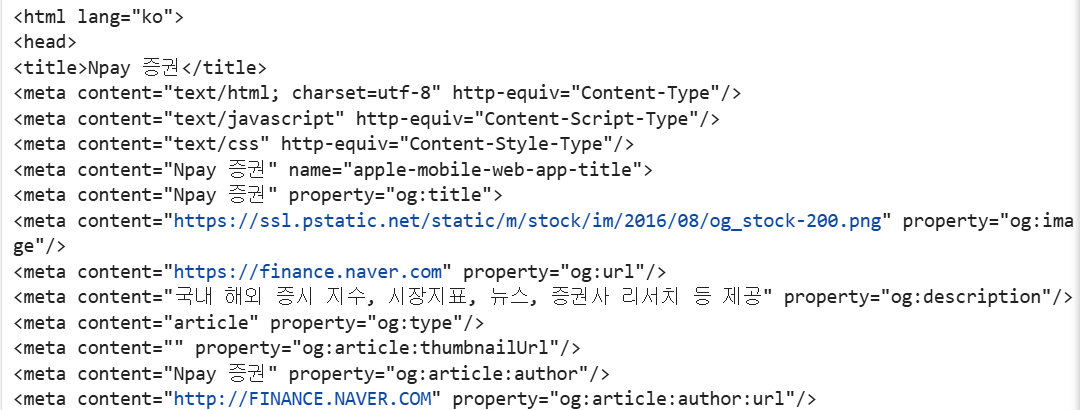
1. 뉴스 제목 크롤링
-.select_one("CSS 선택자"): 조건에 맞는 요소 중 가장 처음에 오는 함수 추출
※CSS 선택자 문법
-태그: (없음) → soup.select_one("h1")
-클래스: . → soup.select_one(".title")
-아이디: # → soup.select_one("#main_link")
-CSS 선택자(태그) 가져오기: 웹 페이지에서 F12 → Elements → 원하는 부분 우클릭 → Copy → Copy selector
※네이버는 실시간 새로고침 할 때마다 CSS 선택자 달라지므로 업데이트 必
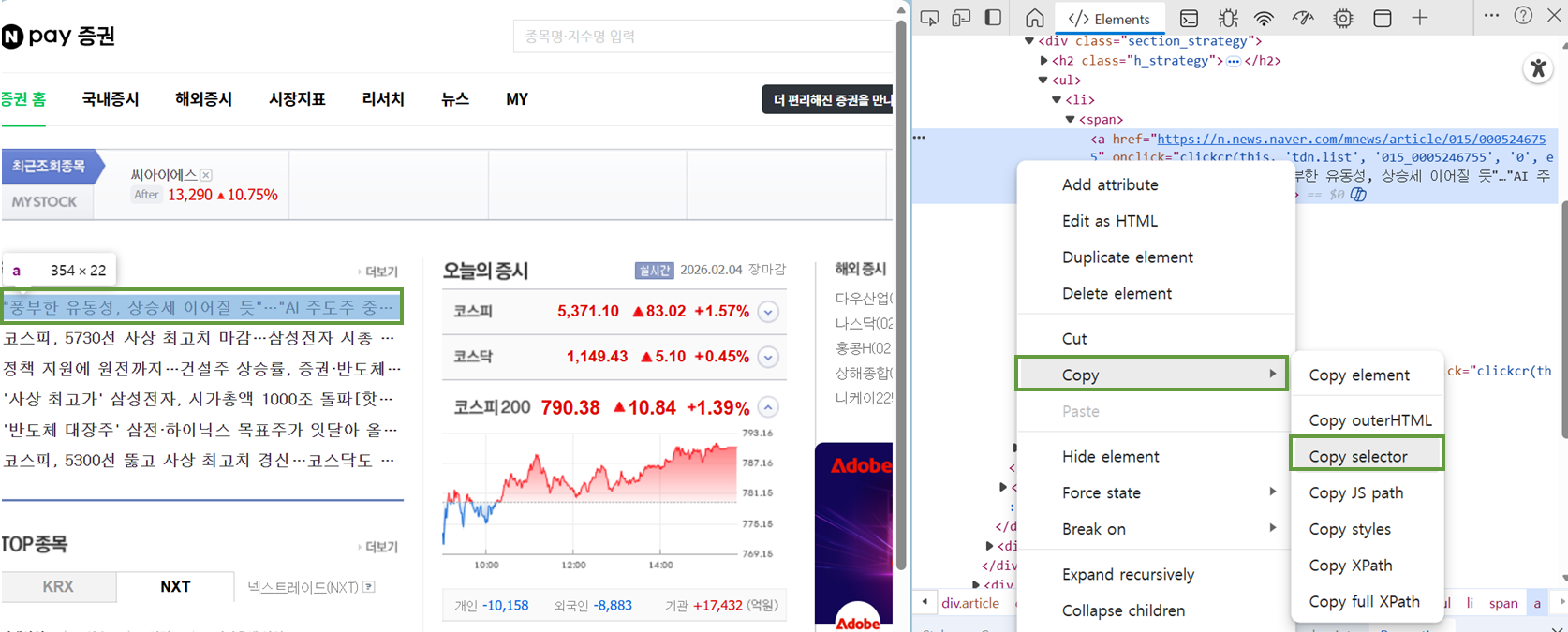
tag = soup.select_one("#content > div.article > div.section > div.news_area._replaceNewsLink \
> div > ul > li:nth-child(1) > span > a")
# \: 다음 줄과 이어지는 코드임을 표현

tag.text
# >>> '"풍부한 유동성, 상승세 이어질 듯"…"AI 주도주 중심 분할매수 전략을"'
# ver.2
# selector = "#content > div.article > div.section > div.news_area._replaceNewsLink > div > ul > li:nth-child(1) > span > a"
# tag = soup.select_one(selector)
# tag.text
2. TOP종목 크롤링
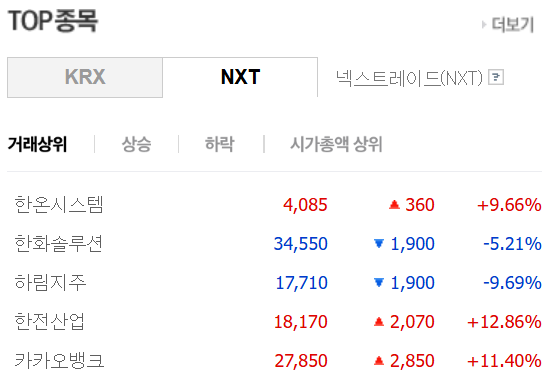
# Top 종목 이름 크롤링
selector = "#nxt_topItems1 > tr:nth-child(1) > th > a"
top1 = soup.select_one(selector)
top1.text
# >>> '한온시스템'
# Top 종목 가격 크롤링
selector = "#nxt_topItems1 > tr:nth-child(1) > td:nth-child(2)"
# 행 번호 열 번호
top1_price = soup.select_one(selector)
top1_price.text
# >>> '4,090'# Top 종목 상승/하락 크롤링
selector = "#nxt_topItems1 > tr:nth-child(1) > td:nth-child(3)"
top1_updown = soup.select_one(selector)
top1_updown.text
# >>> '상승 365'-.strip(): 문자열 앞뒤에 붙어 있는 공백 문자 제거
※공백 문자
-일반 공백: " "
-탭: "\t"
-줄바꿈: "\n"(커서를 다음 줄로 내림)
-캐리지 리턴(커서를 현재 줄의 맨 앞으로 보냄)
# Top 종목 등락률 크롤링
selector = "#nxt_topItems1 > tr:nth-child(1) > td:nth-child(4)"
top1_percent = soup.select_one(selector)
top1_percent.text.strip()
# >>> '+9.80%'
# 자손 선택자 없이 Top 종목 이름, 가격, 상승/하락, 등락률 크롤링
selector = "#nxt_topItems1 > tr:nth-child(1)"
top1_all = soup.select_one(selector)
print(top1_all.text.strip())
# >>> 한온시스템
# 4,090
# 상승 365
# +9.80%
3. 반복문으로 일괄 데이터 수집
-총 15개 종목들을 for문 이용하여 각 데이터 수집 후 리스트로 저장하여 데이터프레임으로 변환
# 총 15개 종목들을 for문 돌면서 각 데이터 수집하기
stock_list = []
price_list = []
updown_list = []
ratio_list = []

for i in range(1, 16):
    # 종목명 리스트로 저장
    selector = f"#nxt_topItems1 > tr:nth-child({i}) > th > a"
    top_stock = soup.select_one(selector)
    top_stock = top_stock.text
    stock_list.append(top_stock)

    # 가격 리스트로 저장
    selector = f"#nxt_topItems1 > tr:nth-child({i}) > td:nth-child(2)"
    top_price = soup.select_one(selector)
    top_price = top_price.text
    if ',' in top_price:
       top_price = int(top_price.replace(",", ""))  # 정수로 변환
    price_list.append(top_price)

    # 상승/하락 리스트로 저장
    selector = f"#nxt_topItems1 > tr:nth-child({i}) > td:nth-child(3)"
    top_updown = soup.select_one(selector)
    top_updown = top_updown.text
    updown_list.append(top_updown)

    # 등락률 리스트로 저장
    selector = f"#nxt_topItems1 > tr:nth-child({i}) > td:nth-child(4)"
    top_ratio = soup.select_one(selector)
    top_ratio = top_ratio.text.strip()
ratio_list.append(top_ratio)-pd.DataFrame({'컬럼명1' : 리스트1, '컬럼명2' : 리스트2, ...}): 수집된 리스트들을 데이터프레임으로 변환(딕셔너리 형태)
import pandas as pd
df_stock = pd.DataFrame({'종목명':stock_list, '가격':price_list,
                         '상승/하락':updown_list, '등락률':ratio_list})
df_stock
-.to_csv("파일명"): csv 파일로 변환
※encoding='utf-8-sig': 한글이 포함된 경우 깨지지 않게 엔코딩
df_stock.to_csv("stock_top.csv", encoding='utf-8-sig')
# >>> 현재 경로에 csv 파일 생성됨
실습용 티스토리 크롤링
url = "https://ai-dev.tistory.com/2/"html = requests.get(url).text
soup = bs(html, 'html.parser')
soup

-.find(): 조건에 맞는 가장 첫 번째 요소 하나만 반환
-.find_all(): 조건에 맞는 요소 모두 찾아 리스트 형태로 반환(.text 바로 쓸 수 없고 인덱스로 접근 必)
# td raw data 확보
td_raw = soup.find('table').find_all('td')
td_raw
# for문 이용하여 텍스트만 추출
td_text_list = []
for td in td_raw:
td_text_list.append(td.text)
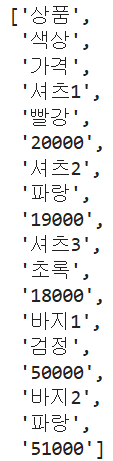
td_text_list# 3개씩 나누어 원래의 표 형태와 유사하게 만들기
rows = [td_text_list[i:i+3] for i in range(0, len(td_text_list), 3)]
rows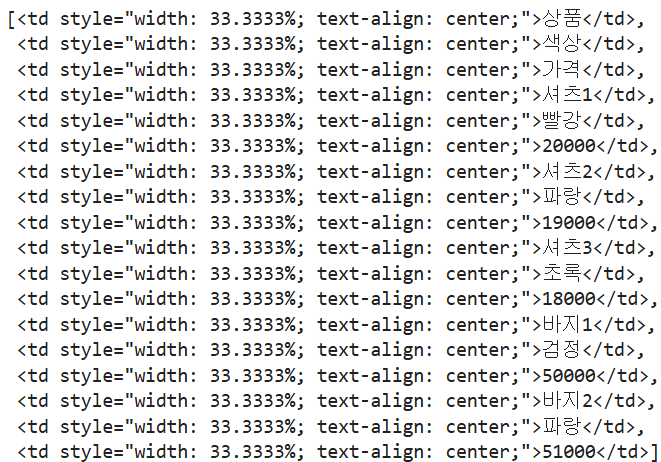

※리스트 컴프리헨션
-[x 관련 실행문 for x in 반복대상 if 조건문]
-규칙에 따라 계산 완료된 후 결과물을은 모든 새로운 리스트 객체가 저장됨
# 정수를 제곱하여 리스트로 저장
temp_list = [i**2 for i in range(1, 6)]
temp_list
# >>> [1, 4, 9, 16, 25]
# 정수 중 짝수만 제곱하여 리스트로 저장
[i**2 for i in range(1, 6)]
# >>> [4, 16]
#부트캠프후기 #멀티캠퍼스부트캠프 # 데이터마케팅부트캠프
'부트캠프 > 멀티캠퍼스_퍼포먼스 마케팅과 데이터 분석' 카테고리의 다른 글
| [멀티캠퍼스 부트캠프 6주차(2)] 데이터 분석 기본_시각화 (0) | 2026.02.12 |
|---|---|
| [멀티캠퍼스 부트캠프 6주차(1)] 데이터 분석 기본_웹 크롤링(selenium) (0) | 2026.02.09 |
| [멀티캠퍼스 부트캠프 5주차(1)] 데이터 분석 기본_웹 통신 개념 (0) | 2026.02.03 |
| [멀티캠퍼스 부트캠프 4주차(2)] 데이터 분석 기본_집계와 시각화 (0) | 2026.02.02 |
| [멀티캠퍼스 부트캠프 4주차(1)] 데이터 분석 기본_파이썬 기초(자료구조, 판다스) (0) | 2026.01.23 |


